IQM platform overview
IQM is a powerful DSP platform that employs many of the familiar principles of advertising technology. This page will cover the common entities, hierarchies, and relationships used by IQM.
Advertising hierarchy
In IQM's organizational framework, insertion orders are the parent hierarchy of advertising. They are created at the Advertiser level (read more in the Organization hierarchy section) with campaigns as their child hierarchy. Campaigns are composed of creatives.
The following diagram and accompanying definitions further describe the relationships between these entities.
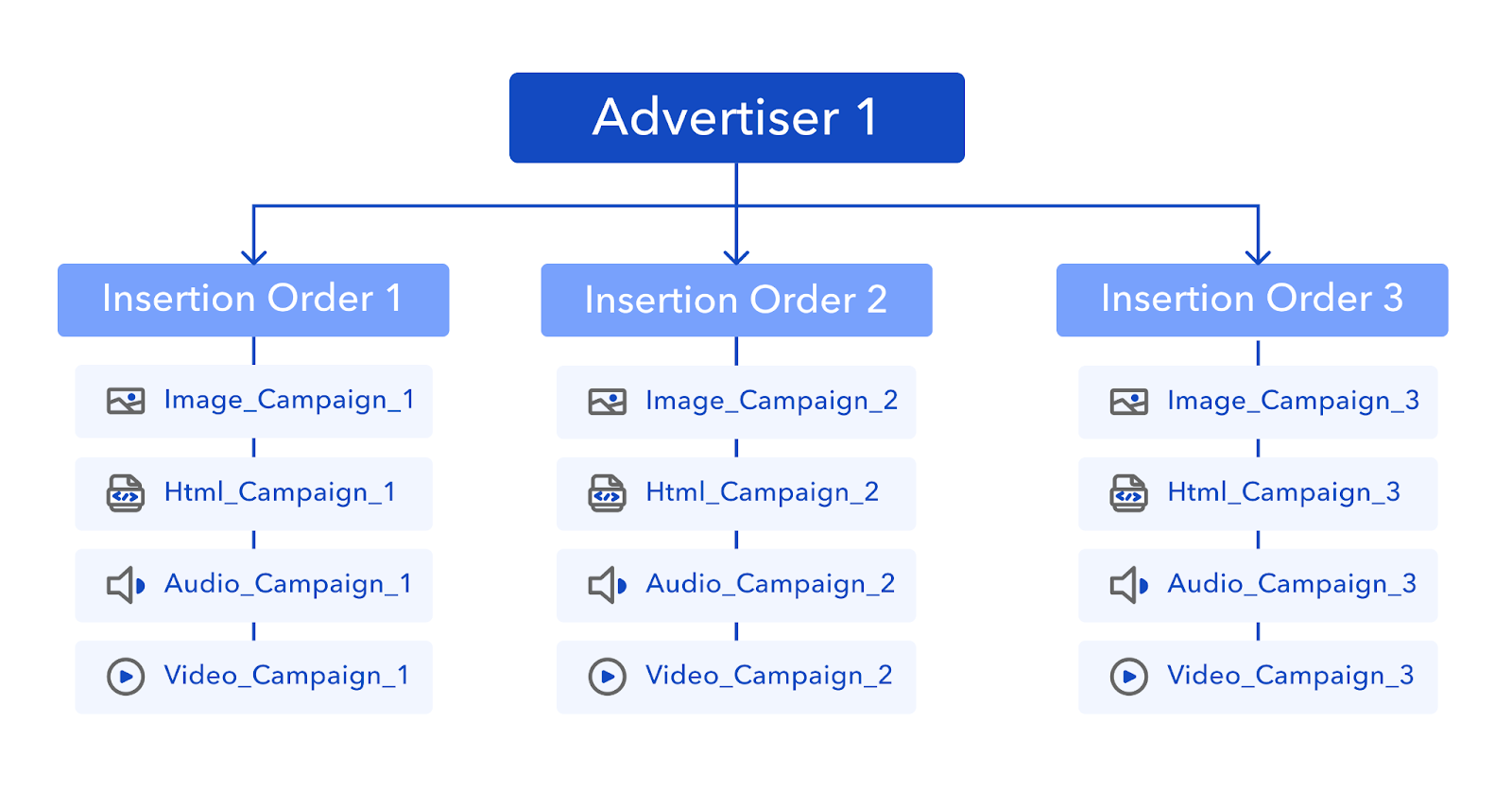
| Entity | Description |
|---|---|
| Advertiser | A user or Customer on the IQM platform that places advertisements with a media partner. |
| Insertion Order (IO) | A contract between an Advertiser and media partner that specifies the details and parameters of an advertising campaign. Refer to Insertion orders (IO) overview for more information. |
| Campaign | A targeted advertising run that operates for a set period of time under specified optimization strategies. Refer to Media planning and campaign setup for more information. |
| Creative | The file containing the actual ad that a user is exposed to. This is commonly in graphical, video, or audio format. Refer to Creatives and specifications for more information. |
Advertising relationships
The IQM platform contains various APIs (applications on the UI) which interact with, retrieve the details of, and modify each advertising entity.
This section will cover some of those relationships and feature tables of common actions and their associated endpoints and Help Center articles.
Insertion orders
Insertion orders are managed in the Campaign API. You can create and modify IOs, duplicate existing IOs, adjust an IO's budget, and delete IOs.
IOs specify important parameters for their campaigns. They dictate the length of time for an advertising campaign and the budget parameters. They can also return details for campaigns grouped by IO IDs.
The Bid Model API also contains important functions for IOs. You can fine-tune advertising targeting strategies by assigning priority metrics to groups of campaigns by their IO ID.
| Action | Endpoint | Article |
|---|---|---|
| Get insertion order details | /api/v3/cmp/io/basic/list | Insertion orders (IO) overview |
| Create an IO | /api/v3/cmp/io/add | Insertion orders (IOs) |
| Update IO budget | /api/v3/cmp/io/update-budget | |
| Assign campaign priority | /api/v3/bm/io/{ioId}/bid-models | Campaign priority overview |
Campaigns
Campaigns are primarily managed in the Campaign API: you can create campaigns, get details, and assign conversions with the Campaign API. Among other functions, campaigns specify important parameters for their associated creatives, they dictate the audience targeting, inventory placement, optimization strategies, assigning conversions, and reporting data.
These APIs also interact with campaigns in important ways:
- Bid Model API - allows you to add Bid Model strategies to campaigns. It can also generate a metrics report by chosen dimensions to evaluate a campaign's performance.
- Conversions API - allows you to assign created conversions to a campaign. This can also be managed in the Campaign API.
- Insights API - allows you to generate a Voter Level Data (VLD) Insights report. A VLD Insights report evaluates ad exposure, demographic data, and voting history details.
- Inventory API - allows you to select inventories for ad placement for a campaign.
- Reports API - allows you to generate, manage, and send reports on campaigns.
Creatives
Creatives are managed in the Creative API. Users can add and manage creatives, get details, and create groups.
| Action | Endpoint | Article |
|---|---|---|
| Get creative details | /api/v3/crt/creatives/{creativeId} | Creatives and specifications |
| Add a creative | /api/v3/crt/creatives | Add creatives |
| Create a new creative group | /api/v3/crt/creatives/groups | Manage creatives and creative groups |
| Add or remove creative to/from group | /api/v3/crt/creatives/groups/modify-creatives |
Organization hierarchy
Workspaces are one of the core entities of IQM's organizational hierarchy. Workspace access allows you to:
- Manage multiple accounts within an agency on the IQM platform.
- Manage the permissions and credentials of assigned Organizations/Advertisers (known as Customers in this relationship) so they can access reporting and audiences.
- Perform financial operations related to margins, costs, invoices, and credits.
- Access real-time data and reporting across assigned Customers in one place.
Organizations/Advertisers, once assigned to a Workspace User:
- Place advertisements with the DSP service.
- Create and manage insertion orders and campaigns.
- Manage their own balances.
A Workspace User may have access to multiple Organizations/Advertisers, but may only have access to certain apps as determined by the Workspace.
The following diagram and accompanying definitions further describe the relationships between these entities.
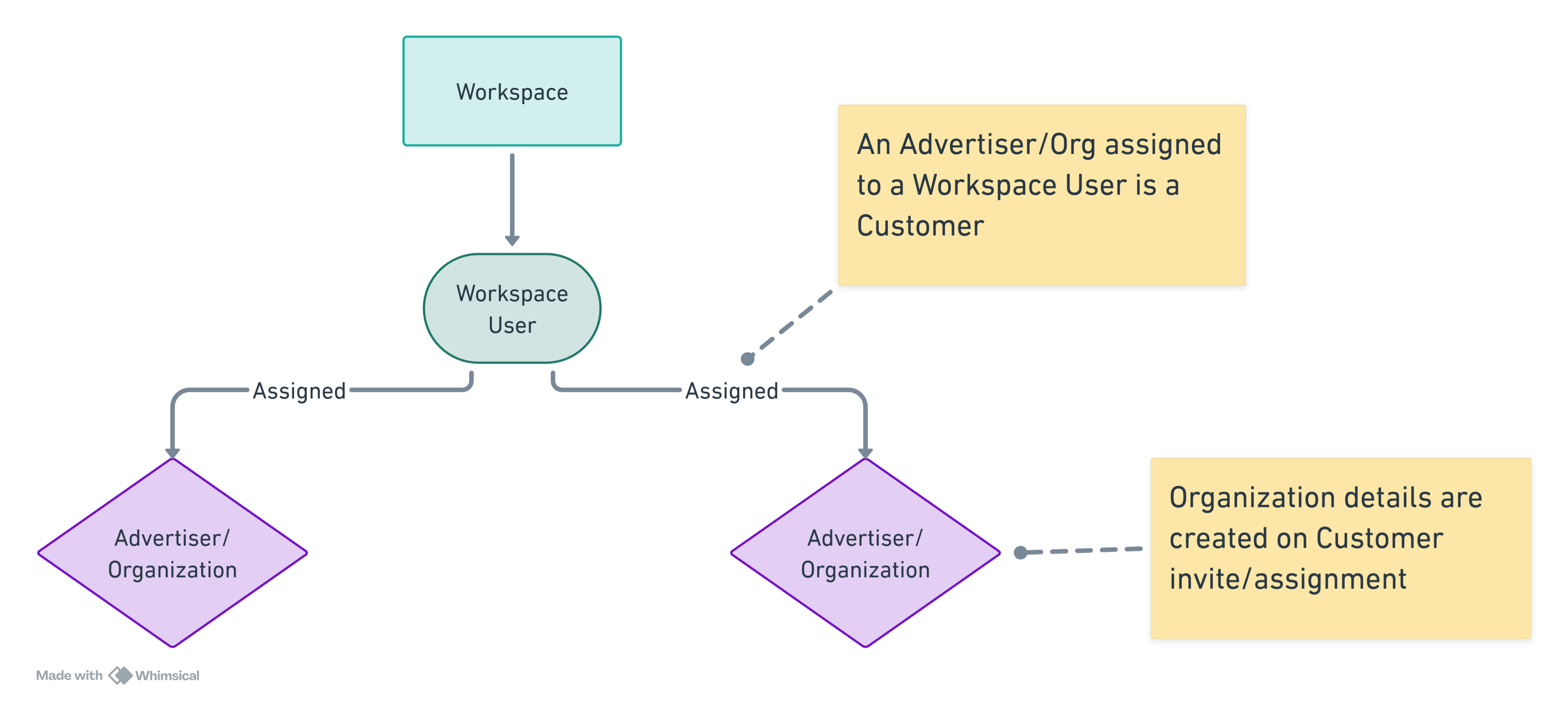
| Entity | Description |
|---|---|
| Workspace | An agency account that defines permissions and credentials for Customers. |
| Workspace User | An individual who uses the platform in a Workspace. A Workspace User has Advertisers assigned as their Customers. |
| Organization/Advertiser | An Organization is any company that places advertisements and is assigned to a Workspace User. When invited as a Customer, an Organization is created with details including its name, website, and location details. |
Organization relationships
Organizations, Workspaces, and Users are primarily managed in the User Management API and the related Workspace API. The Finance API also manages the various financial relationships that exist between Workspaces and Advertisers.
| Action | Endpoint | Article |
|---|---|---|
| Send user invitation | /api/v3/ua/user/invite | Invite and manage users |
| Sign up user | /api/v3/ua/sign-up | Sign up and authentication |
| Add app access for user | /api/v3/ua/user/application/add | Invite and manage users - Manage a user's app access |
| Create a Workspace | /api/v3/ua/workspace | |
| Organization details | /api/v3/ua/organization/view-profile | Organization management |
| Organization management | /api/v3/ua/organization/update-profile | |
| Get Customer details | /api/v3/ua/customers/list | |
| Invite Customer to platform | /api/v3/ua/customer/invite | |
| Get Advertiser details | /api/v3/ua/organization/advertisers/list | |
| Add Advertiser profile | /api/v3/ua/organization/advertiser/add | |
| Get Customer finance details | /api/v3/fa/customer/payments/list | |
| Invoice management | Finance API guidelines | |
| Credit management | Finance API guidelines | |
| Add payment for Customer | /api/v3/fa/customer/payment/add |